Baby Tracker App Android: What to Look for in 2026
At 6 a.m., you're trying to remember whether the last bottle happened before or after the diaper change. Your partner is already reaching for the door, your baby can't fill in the gaps, and the daycare pickup later will bring another rushed handoff. A baby tracker app for Android should reduce that confusion, not give you one more system to maintain.
The useful question isn't which app has the most charts, timers, or predictions. It's whether every caregiver can see the same recent history, add the next update quickly, and understand what happened before their shift began. That handoff between parents, partners, grandparents, nannies, and daycare is the true job.
Table of Contents
- Why the Handoff Is the Real Problem
- What a Baby Tracker App Android Families Need
- Features That Actually Make Sharing Work
- Native App Versus Browser for Daycare and Nannies
- Setting Up a Tracker Your Whole Household Will Use
- Privacy, Data, and Who Sees Your Child's Day
- How Cradlo Fits This Picture
- Your Short List Before You Tap Install
Why the Handoff Is the Real Problem
The trouble usually appears between caregivers, not during the log itself. One parent records a short nap, the other remembers only that the baby was “fussy,” and the nanny arrives with no clear idea when the last feed ended. By pickup, a caregiver has thirty seconds to explain the morning while a child who can't narrate it waits nearby.
Small gaps create unnecessary uncertainty. A bottle goes unrecorded. A nap note uses a different format. One caregiver gives medication, another assumes it still needs to happen. These aren't failures of effort. They're predictable results of several people caring for the same child across separate phones, rooms, and routines.
Practical rule: Choose a tracker that makes the next caregiver informed before they have to ask.
Many Android trackers still feel designed for one parent sitting on a couch with uninterrupted attention. That model breaks down when one caregiver uses Android, another uses an iPhone, and daycare works from a shared tablet or browser. A note stored only on one phone can't coordinate a household, even if the logging screen itself is excellent.
The handoff needs a shared timeline with clear ownership. Parents should know who logged the last feed. Grandparents should be able to add a diaper change without borrowing a password. Daycare should be able to report a nap without joining a complicated household workflow.
That changes how you evaluate every feature. Fast logging matters because someone may be holding a baby. Sync matters because another caregiver may be deciding what to do next. Access controls matter because not everyone needs to see every private note. The strongest app is the one that connects shifts of care, rather than turning infant care into an administrative project.
What a Baby Tracker App Android Families Need
Start with one reliable record for each child. It should hold the events your household discusses, such as feeds, diapers, sleep, pumping, mood, medication, and short notes. The purpose isn't to capture every moment. It's to give the next caregiver enough context to continue the routine safely and confidently.
Once a second caregiver joins, the requirements become more demanding.
One timeline across different devices
The same child record should appear on an Android phone, an iPhone, and the web without making caregivers copy information manually. A partner shouldn't need a text message summarizing a feed that was already logged, and a grandparent shouldn't need access to the primary caregiver's personal account.
Real-time visibility is especially useful during transitions. If a nanny logs a bottle before leaving, the parent can see it without waiting for a verbal update. If a parent records a nap at home, the next caregiver can start from the current record rather than guessing.
Offline resilience
A tracker should continue accepting entries when Wi-Fi or mobile service disappears. Android-style offline-first design stores actions locally, queues deferred writes, and reconciles them with the server when connectivity returns, as described in Google's AppSheet synchronization guidance.
That matters in basements, transit, airports, parks, and daycare rooms with unreliable connectivity. Offline support is only trustworthy when the app also handles conflicts deterministically, so two caregivers' entries don't overwrite each other or disappear without a trace.
Flexible caregiver access
Not every helper needs the same experience. A parent may want full editing and history. A grandparent may need simple event logging. A daycare worker may need a browser view for today's care rather than another permanent mobile account.
These four layers, shared data, cross-platform access, offline reliability, and appropriate participation, should come before sleep predictions or decorative charts. If an app can't bridge the handoff, extra features won't solve the central problem.
Features That Actually Make Sharing Work
Evaluate each feature against a real moment in the day. A polished store listing can mention “family sharing,” but that phrase doesn't tell you whether the app supports separate identities, live updates, or practical daycare access.
Real-time shared logs
A saved entry should become visible to the other caregiver without a manual export or a confusing refresh routine. If your partner sees a feed immediately, they won't prepare another bottle based on outdated information. The benefit is simple: fewer duplicate actions and fewer “did you already do that?” conversations.
Look for a timeline that shows the event, time, and person who recorded it. That small attribution detail helps resolve ambiguity when two caregivers remember the same morning differently.
Named caregiver identities
Separate logins are cleaner than sharing one household password. A family can invite a partner, grandparent, nanny, or daycare contact with a role that reflects what they do. Independent comparison coverage describes shared timelines where each adult has an individual login, allowing entries to remain connected without password sharing (caregiver identity examples).
A QR invitation can make the first setup less awkward. A nanny standing in the hallway can scan, accept the right permissions, and begin logging without a long explanation about household credentials.
Offline capture and reconciliation
Test this rather than trusting the label. Turn off connectivity and log a feed or diaper change. Then reconnect and check whether the event appears once, keeps its original time, and remains linked to the right caregiver.
The underlying pattern should queue local writes and merge them when the connection returns. That's more dependable than an app that merely displays old information while offline but refuses to save anything new.
Browser access for outside caregivers
Daycare staff may work from a shared tablet, locked device, or classroom computer. A browser-based sheet or shared timeline can let them record feedings, naps, and diaper changes without installing a full app, a setup described in daycare browser tracking coverage.
Privacy controls
Sharing shouldn't mean exposing every detail to everyone. Parents may want daycare to see daily feeds and naps while keeping pumping notes, medical details, or private observations limited to the inner circle.
Check whether permissions apply by caregiver role, whether invitations can be revoked, and whether the app shows exactly who can access each type of information. Those controls turn a shared tracker into a coordinated care record rather than a wide-open family feed.
Native App Versus Browser for Daycare and Nannies
A native Android app and browser access solve different problems. Treating one as universally better usually creates friction for someone on the care team.
A daycare center may use iPads on locked carts and prohibit new installations. In that setting, a native-only tracker fails before anyone can evaluate its logging speed. A bookmarked browser page lets staff record a bottle or nap from the device already available, then sends the update to the parents' phones. For more detail on this arrangement, see how daycare apps support parent coordination.
A family nanny has a different need. They may move between homes, parks, and transit routes where connectivity is inconsistent. A native Android app can save entries offline and use device notifications, provided those entries later appear on the parents' shared timeline.
| Factor | Native Android App | Browser or QR Invite |
|---|---|---|
| Setup | Requires installation and permissions | Opens from a link or scan |
| Offline use | Usually better for local event capture | Depends on browser and connection support |
| Notifications | Can support push reminders | Usually more limited |
| Shared devices | May be blocked by device policy | Works well on tablets or computers |
| Caregiver turnover | More cleanup when someone leaves | Easier to grant or remove access |
| Best fit | Parents and regular nannies | Daycare staff and occasional helpers |
Native apps tend to win for one-handed logging, push reminders, and offline writes. Browsers win when a caregiver needs zero-install access or uses a shared device that shouldn't retain another family's app permissions.
The practical answer is a mixed setup. Parents and a regular nanny may use the Android app, while daycare uses a browser or QR entry view. Each caregiver gets a path that matches their day, and the child's timeline stays unified behind the scenes.
Setting Up a Tracker Your Whole Household Will Use
Setup works better as a few deliberate decisions than as a long form completed in a sleep-deprived rush. Start with the events that affect the next handoff: feeds, diapers, sleep, and medication. Add pumping, solids, mood, growth, or milestones only when someone in the household has a reason to use them.
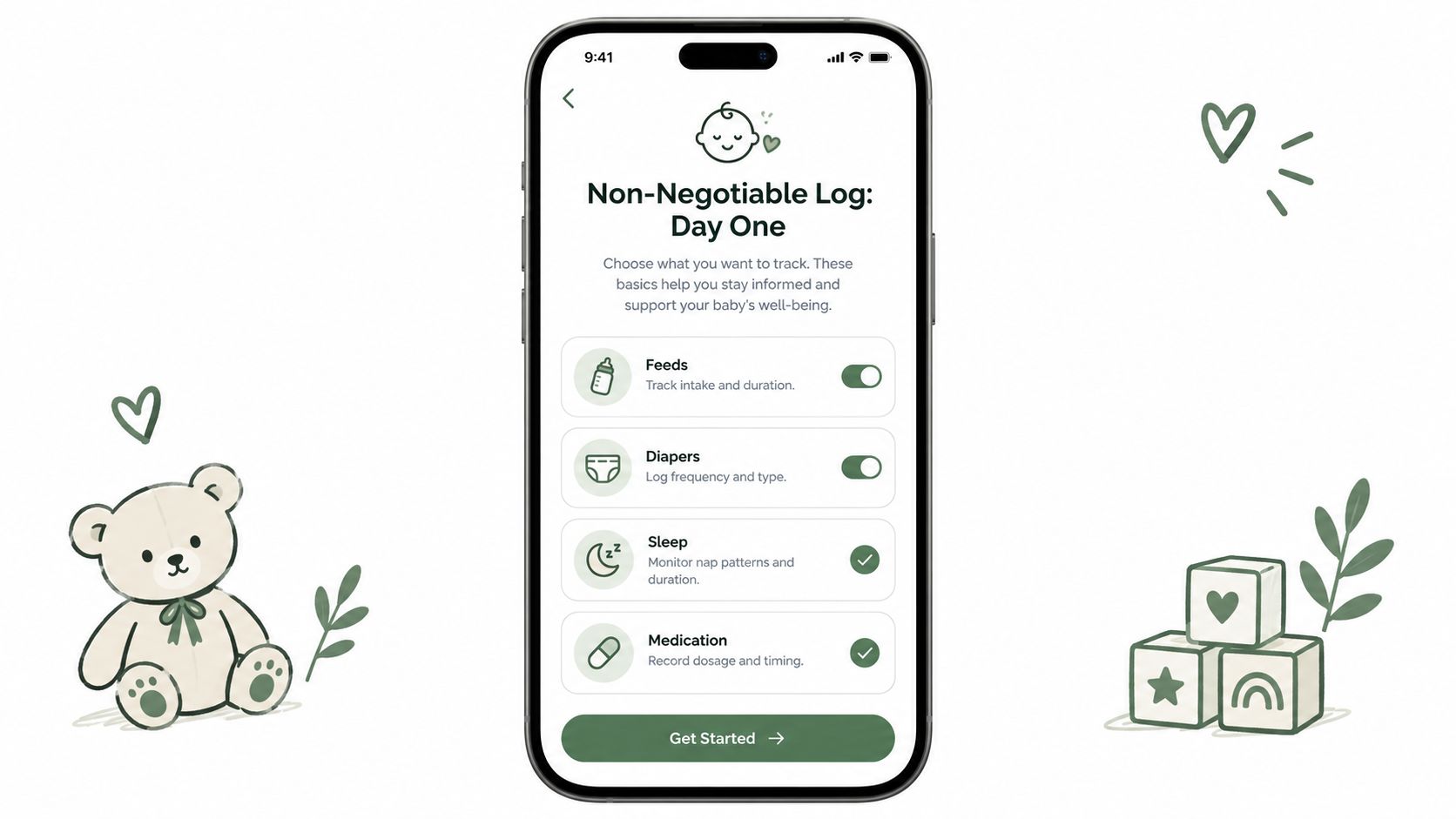
A focused starting record is easier to trust. If the app asks for too much before the first useful entry, tired caregivers may abandon it before the routine settles.
Decide who can do what
Give full editing access to the people responsible for the child's overall record. Use narrower caregiver permissions for helpers who only need to log daily events. Read-only access can suit a relative who wants to stay informed without changing the timeline.
Invites should explain the purpose in plain language. “Scan this to log naps and bottles during your shift” is more approachable than “Join the household workspace and configure permissions.” A grandparent using an older Android phone needs a clear first action, not a technical orientation.
Seed the record for handoffs
Before daycare begins, agree on units, time conventions, allergy notes, and emergency contacts. Keep health questions with your pediatrician or lactation professional. A tracker can organize observations, but it shouldn't replace clinical guidance.
A simple onboarding order works well:
- Create the child profile and choose the basic units.
- Add the primary caregivers with individual identities.
- Turn on only the notifications people will respond to.
- Invite daycare or a nanny with the narrowest useful access.
- Run one test entry from each caregiver's device.
Watch for duplicated entries during the first few days. Delayed alerts can make two parents log the same feed, while a nanny may stop opening the app if the workflow gives no useful reminder. Fix those problems early by agreeing on who logs which events and whether a caregiver should edit an error or leave a correction note.
For a practical starting point, use this baby feeding log template as a reference for deciding what your household wants to record. The right setup should feel lighter after a week, not more demanding.
Privacy, Data, and Who Sees Your Child's Day
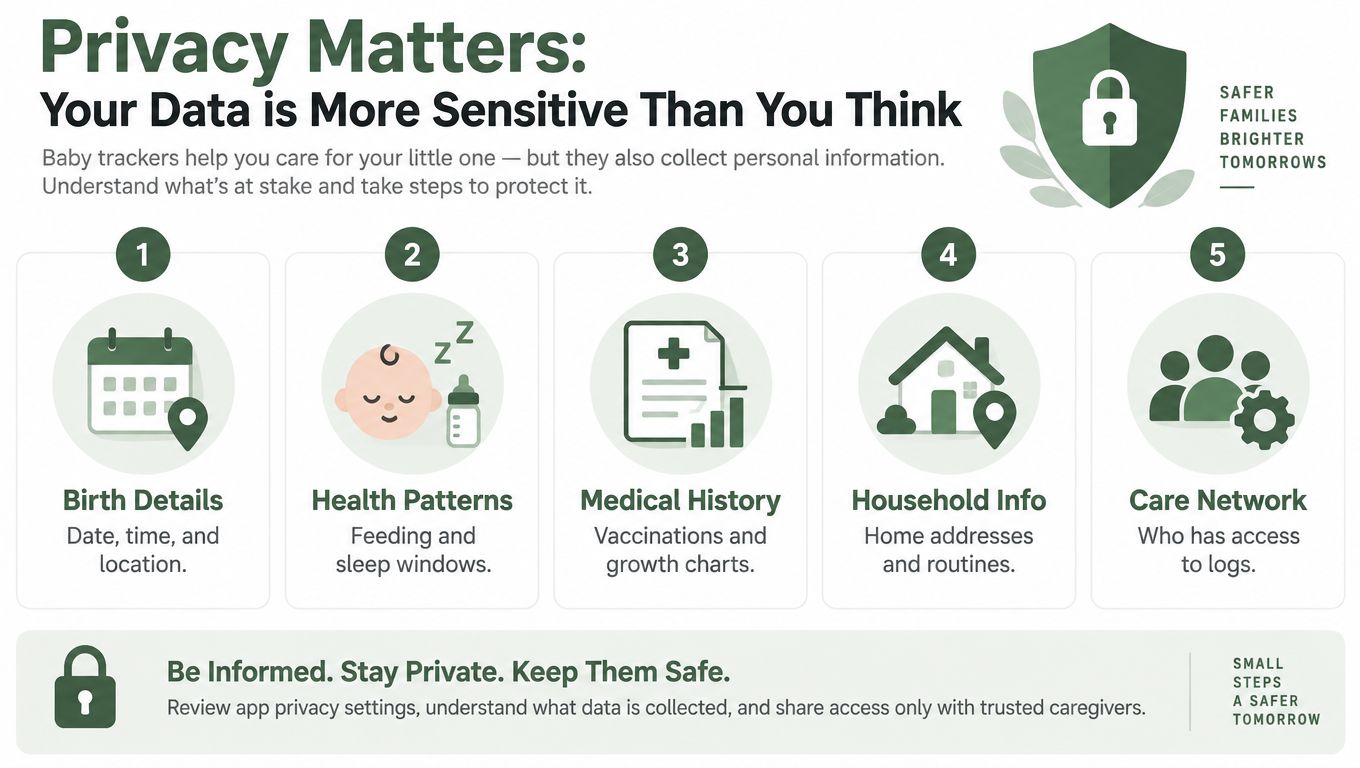
A baby tracker can contain a surprisingly intimate picture of family life. Birth details, feeding patterns, sleep windows, vaccination history, home routines, and care contacts all sit close together. That deserves the same deliberate attention you'd give any sensitive health-related record, without turning privacy into a source of panic.
Independent analysis found that 14 baby-tracking apps shared data with third parties, including due dates and pregnancy-loss information, according to research on datafication in baby-tracking apps. The finding is a useful reason to read an app's disclosures before inviting a whole care network, not a reason to stop tracking altogether.
Questions worth answering first
Look for direct answers to these points:
- Storage: Where does the service keep entries, and which company controls the account?
- Encryption: Does the provider explain encryption during transmission and while stored?
- Deletion: Can you delete the child's record, and what happens after cancellation?
- Sharing: Does the app share personal or aggregated usage data with third parties?
- Access: Can you revoke a nanny, daycare, or former partner without changing everyone else's login?
Google Play disclosures commonly cover data sharing, encrypted transit, and deletion options, but read the app's own privacy explanation as well. A store label is useful context, not a substitute for understanding the service's retention and access rules.
Match visibility to responsibility
A daycare teacher may need today's feeds, naps, and diaper changes. They don't necessarily need old growth records, pumping details, or private medical notes. Role-based access keeps the shared timeline useful while limiting unnecessary exposure.
Avoid public links that expose a child's history. Use individual invitations where possible, review the active caregiver list occasionally, and remove access when a childcare arrangement ends. Treat this like baby-proofing a room. It's a practical setup task that protects ordinary family life.
You can review Cradlo's stated approach on its privacy information page before deciding whether its sharing model fits your household. Health questions still belong with a pediatrician or lactation professional, even when the app helps organize the information you bring to them.
How Cradlo Fits This Picture
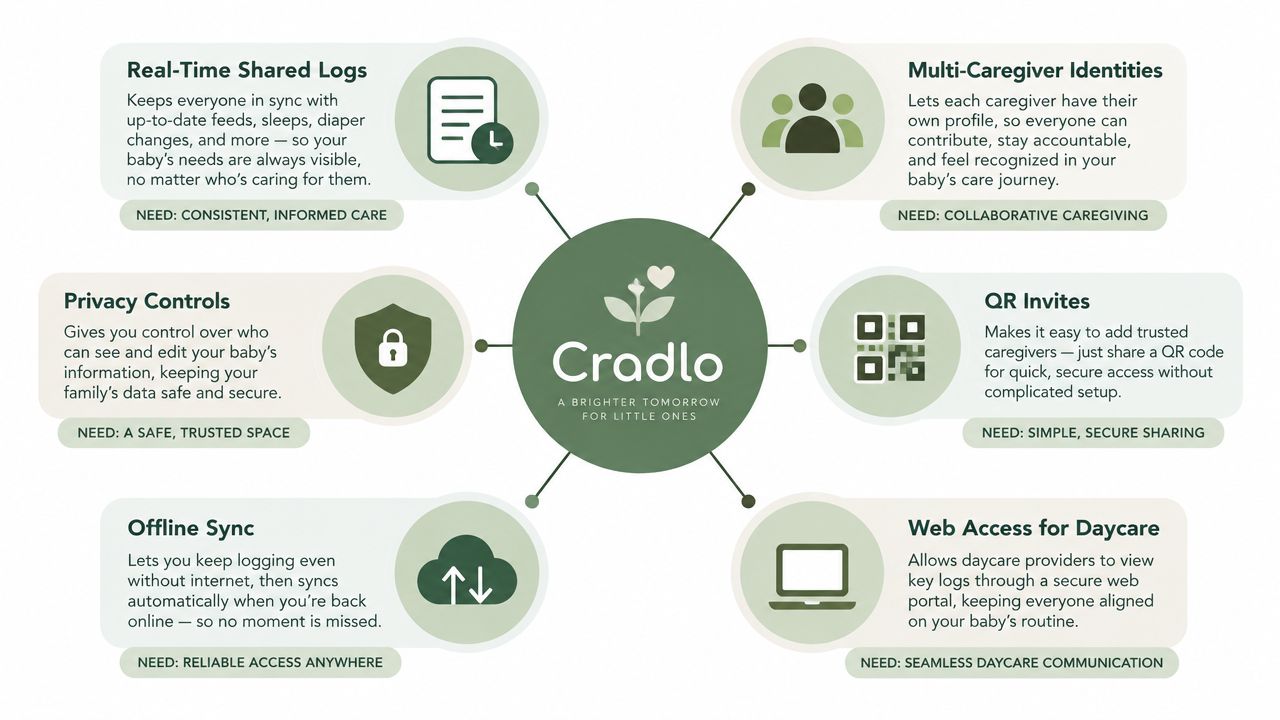
The handoff test is straightforward. Can one caregiver record an event quickly, can the next caregiver see it, and can each person access only what they need? Cradlo is built around that shared-care model rather than treating family access as an extra layer added after solo tracking.
The shared family log brings feeds, sleep, diapers, pumping, solids, growth, mood, notes, and related care events into one timeline. Entries sync across iPhone, Android, and the web, so an Android user doesn't become the isolated member of an otherwise mixed-device household.
Handoff test: The next caregiver should be able to answer “what happened recently?” without opening a group chat.
Cradlo uses individual caregiver identities and QR-code invites for partners, grandparents, nannies, and daycare contacts. That avoids a shared password and makes it easier to remove one person later without disrupting the rest of the household.
Daycare access follows a different route. A provider can use a browser-based entry view from a bookmarked iPad or another shared device, without installing a full mobile app or creating a separate account. The logs then flow into the parents' view, which keeps the classroom handoff connected to the home routine.
Where the design earns its place
Offline capture supports caregivers who need to log during a shift with unreliable service. Entries can wait locally and reconcile after the phone reconnects, which is the practical difference between “works offline” and “shows an old screen offline.”
Privacy controls support narrower access for helpers. A babysitter can record the events relevant to the shift without automatically receiving every private family note. Cradlo also offers English and Spanish, an important consideration for families where caregivers communicate across both languages. Independent company information describes an English-Spanish parenting app as a mainstream product consideration, not an unusual edge case (bilingual parenting technology context).
The result is less about collecting more data and more about making existing care information available at the right moment. Cradlo offers a 7-day free trial on the monthly plan, but it has no free plan, so check the current terms before starting.
Your Short List Before You Tap Install
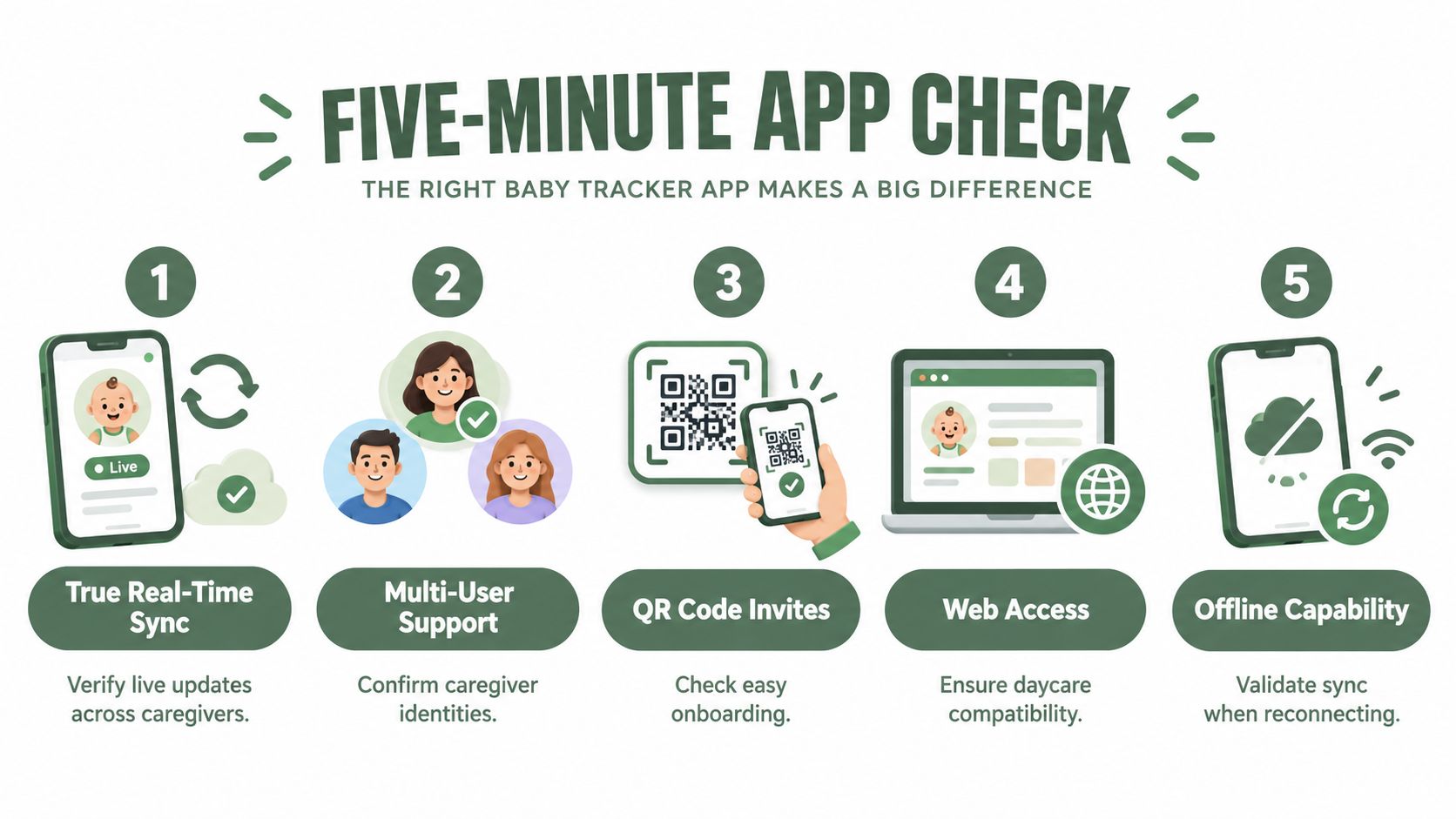
Give an app ten quiet minutes before you commit. You're not looking for the longest feature list. You're checking whether the care handoff will work on an ordinary, tired day.
- Confirm live sync: Save an entry on Android and verify that another caregiver can see it without manual exporting or repeated refreshing.
- Check caregiver access: Look for separate identities, role permissions, and an invite or browser option for grandparents, nannies, and daycare.
- Test offline logging: Disable connectivity, record an event, reconnect, and confirm the entry appears once with the right time and caregiver.
- Read the privacy terms: Check child-data sharing, encryption disclosures, deletion, retention, and how you revoke access.
- Review the price structure: Confirm whether the cost changes with additional caregivers, history, or children, and note what remains available after the trial.
The right tracker should fade into the routine. Evaluate it during a calm hour, not at 2 a.m., and choose the one that makes the next handoff clearer without adding guilt or extra work.
Cradlo brings shared real-time logging across Android, iPhone, and the web, with individual caregiver identities, QR invites, daycare browser access, offline sync, and English and Spanish support. Try the 7-day monthly trial and see whether it makes your family's next handoff easier, then visit Cradlo to get started.