Daycare Sign in Sheet: Template and Fields to Include
You're at pickup with a bag over your shoulder, your child ready to go, and a teacher asking who's collecting tomorrow. A daycare sign in sheet can make that busy doorway moment easier, provided everyone knows what to write and who confirms the handoff. Think of it as a shared record of responsibility, not another test for tired parents.
Table of Contents
- Daycare Sign In Sheet Fields at a Glance
- Building an Authorized Pickup List That Matches the Sheet
- How to Fill In the Sheet at Drop-Off and Pickup
- Recording Nanny, Grandparent and Late Pickups
- Choosing Between Paper, Spreadsheets and Shared Trackers
- Confirm the Sign In Routine With Your Daycare
Daycare Sign In Sheet Fields at a Glance
Say it's 5 p.m., and a parent and teacher remember yesterday's pickup differently. The parent thought a grandparent collected the child; the teacher remembers a nanny. A completed record gives them something clearer than memory: who brought the child, when care began, and who took the child home.
The fields below are a starting template, not a promise of compliance everywhere. For example, Australia's attendance-record regulation requires each child's full name, arrival and departure dates and times, and signatures made at arrival and departure. Your daycare's approved form may require more than this starting layout.
Daycare sign in sheet fields and what each one records
| Field | What to record | Why it matters |
|---|---|---|
| Child's full name | Full legal name as on the enrollment form | Keeps the row tied to the right child |
| Date | Day of care in day, month, year order | Groups rows for review and retention |
| Arrival time | Actual time from a clock at drop-off | Shows when care began |
| Drop-off adult | Name and relationship to the child | Shows who handed the child over |
| Drop-off signature or initials | Signed by the adult dropping off | Confirms the handoff happened |
| Departure time | Actual time from a clock at pickup | Shows when care ended |
| Pickup adult | Name and relationship to the child | Shows who took the child home |
| Staff initials | Initials of the staff member who received or released the child | Confirms the daycare recorded the handoff |
| Notes | Routine updates such as meals or naps | Helps the next caregiver; not for health concerns |
Leave room for both ends of the handoff
Use a row per child per day, with separate spaces inside the staff-initials cell for receiving and releasing the child. Beside the pickup adult's name, leave room for their signature too. The drop-off signature doesn't confirm the later departure, and initials shouldn't replace a full signature where the program requires one.
The optional notes cell can say that lunch was eaten or a nap ended early. Keep it brief and routine. Discuss health concerns directly with daycare and your child's pediatrician rather than relying on a sign-in row.
Print or copy these fields, then have the coordinator approve the layout. At departure, check that the day's row includes both actual times and both adults' signatures, along with staff confirmation.
Building an Authorized Pickup List That Matches the Sheet
Recording a pickup isn't the same as authorizing it. The attendance sheet tells staff who completed a handoff. A separate authorization list tells them whether that person may collect the child.
ChildCare.gov's guidance on provider contracts identifies authorized adults as information families can expect to address in the contract. Parents or guardians name the approved adults; staff use the program's identity-checking procedure when those adults arrive.
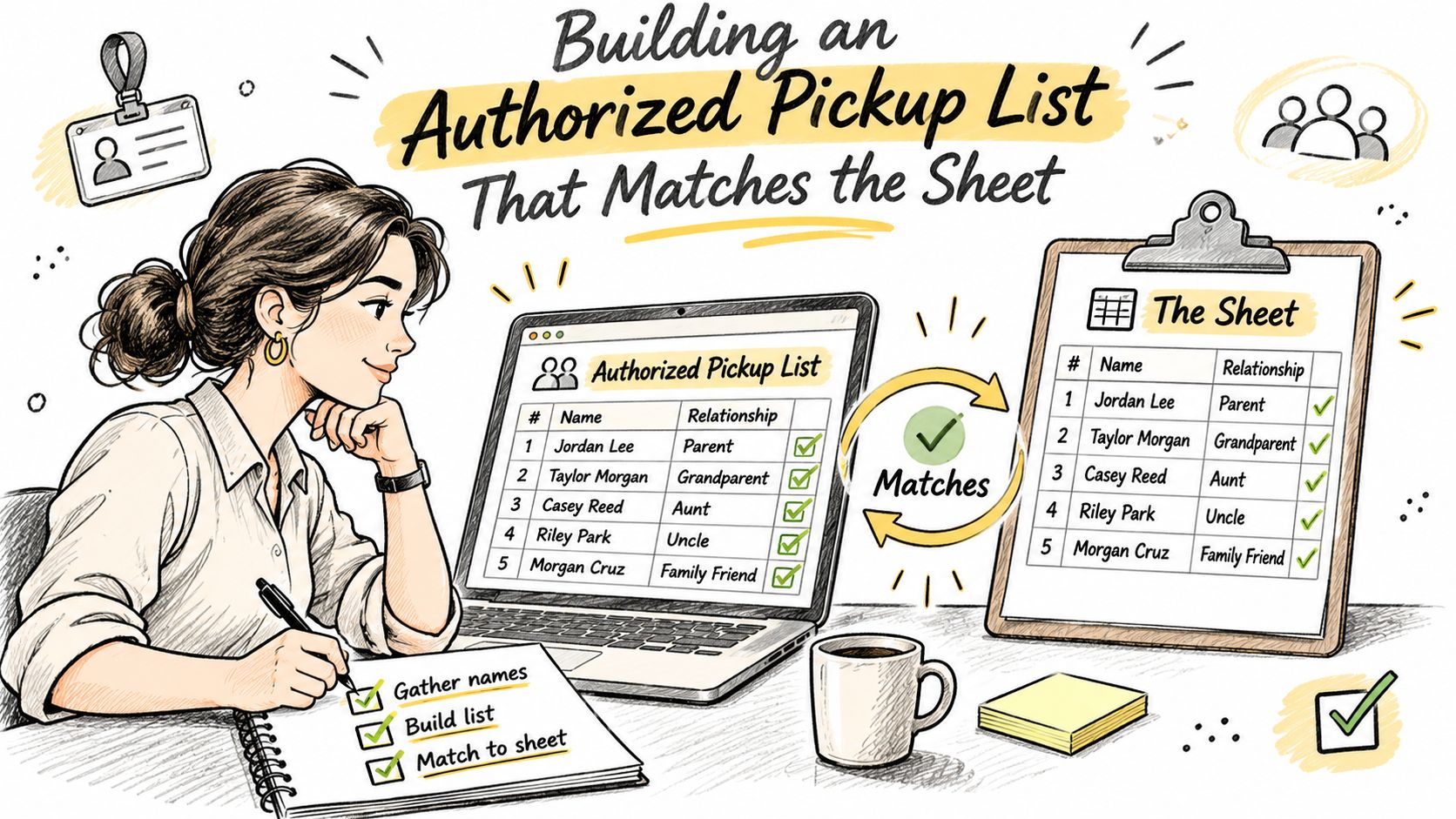
Authorized pickup list template
These fictional entries show a completed example. Mark photo ID as checked only after staff have checked it under the program's procedure.
| Adult | Relationship | Verification phone | Photo ID checked |
|---|---|---|---|
| Rosa Delgado | Grandmother, Monday and Wednesday pickups | Family-provided number | Yes |
| Daniel Kim | Father | Family-provided number | Yes |
| Priya Anand | Nanny, weekdays from 8 a.m. | Family-provided number | Yes |
| Tomas Reyes | Uncle, emergency only | Family-provided number | Yes |
A grandmother's regular pickup days help staff understand the arrangement, but a schedule note shouldn't substitute for permission. Likewise, a nanny starting after enrollment needs to be added through the daycare's process before collecting the child.
Keep one clearly current version
Tell the daycare in writing when a partner, grandparent, nanny, or au pair is added or removed. Ask staff to replace the active list and archive the previous version according to their records policy, rather than leaving competing handwritten updates at the door.
A familiar face still needs a current authorization check. Staff shouldn't have to decide whether an old message or yesterday's conversation overrides the list.
Practical rule: The name on the pickup record should match the person at the door and the current authorization record.
Spanish-speaking families can ask whether the list and attendance form are available in Spanish. A monthly review, plus a check whenever schedules change, can help keep details current. The daycare contract and applicable licensing rules control the final process.
How to Fill In the Sheet at Drop-Off and Pickup
The record works best when the adult at the door enters the time as the handoff happens, not later from memory. Keep the clipboard or device where families can reach it without blocking the entrance, and ask staff which clock everyone should use.
A departure entry means the child has left the daycare's care. Don't complete it early while you're still talking with the teacher or gathering belongings.
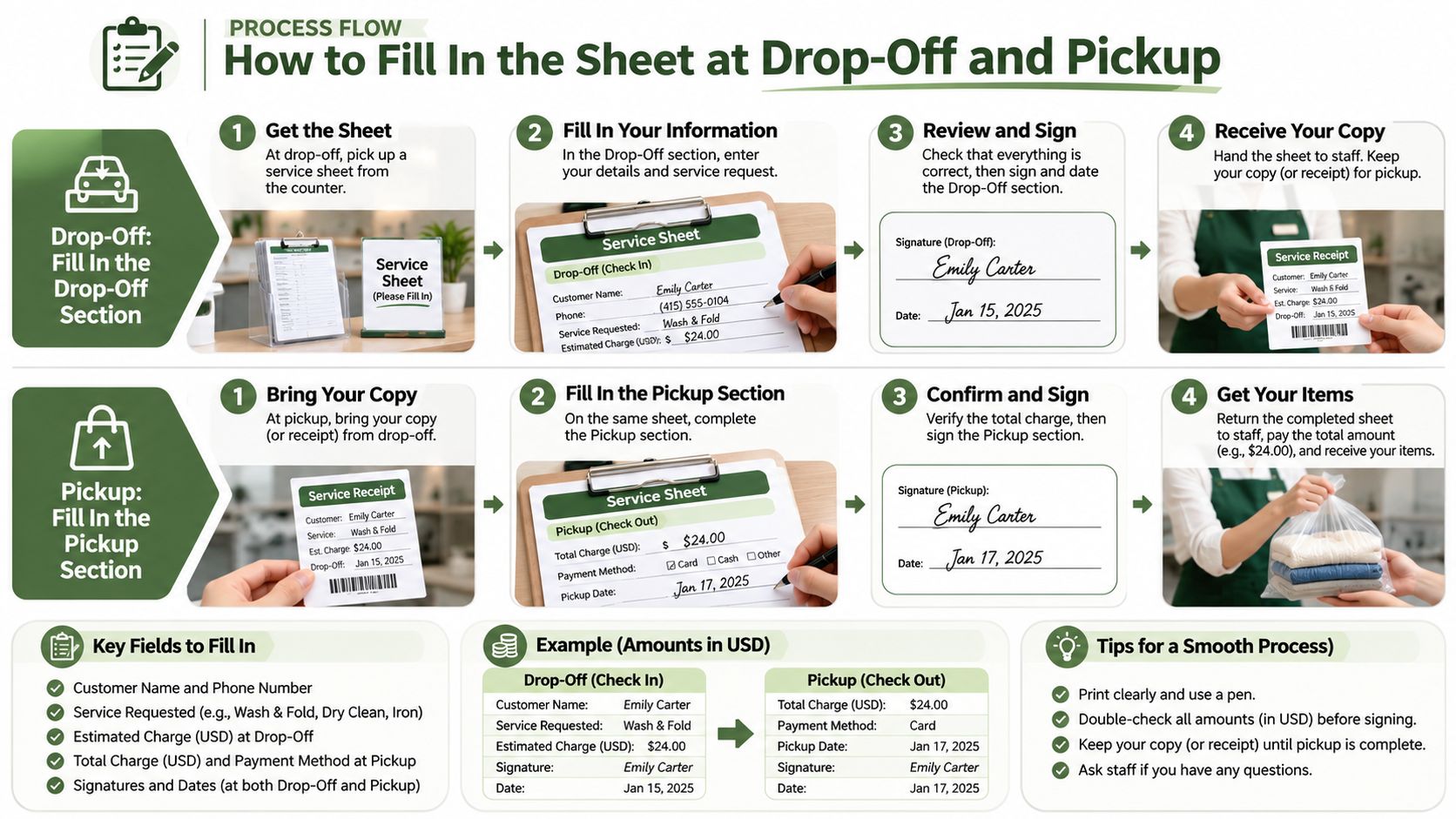
Complete the arrival together
-
Write the date and child's full legal name. Match the enrollment record so staff don't have to interpret a nickname or distinguish children with similar names. If the roster is preprinted, find your child's row before writing anything.
-
Enter the actual arrival time from the clock. An estimate can make later attendance review harder. A time such as “around 5” doesn't identify the handoff clearly enough, whether written at arrival or departure.
-
Add your name, relationship, and signature. Use your own identity, even if you're dropping off on another adult's behalf. A missing signature leaves staff without the adult's confirmation, so check this field before moving away.
-
Have staff confirm receipt with their initials. Follow the program's procedure for confirming that the child has joined the room or group. Don't fill the staff space yourself or assume another family's teacher has accepted responsibility.
Finish the departure before leaving
-
The collecting adult enters the departure time and their own name. They should also sign the pickup space. If a partner handled the morning arrival, leave that entry intact rather than replacing it with the pickup adult's details.
-
Staff verify authorization and initial the release. Give them time to complete their check before taking the child out. This separates the adult's statement that they collected the child from the daycare's confirmation that it released the child.
-
Review open rows before closing. Staff should investigate blank departures and ask the relevant adult or teacher to confirm what happened. If you notice your child's row is incomplete, flag it rather than supplying a time you don't know.
For a daily overview beyond attendance, keep routine care information in a separate day care summary. That gives the next caregiver useful context without crowding the handoff fields.
A complete row has arrival and departure times, signatures from the adults completing those handoffs, and staff initials for receipt and release.
By the close of the day, no child's completed attendance row should have an unexplained blank. A child who didn't attend should be recorded through the program's absence process, not given an invented arrival.
Recording Nanny, Grandparent and Late Pickups
A nanny arrives instead of a parent. That change can be straightforward: the nanny writes their own full name, staff verify authorization, and the record reflects who collected the child. If the program requires confirmation of a changed arrangement, record the parent's approval in the designated notes area without treating that note as a substitute for authorization.
Exceptions need a clear next action, not a guessed entry. Keep the distinction between documenting an event and approving a release visible.
How to record each pickup exception
| Situation | What to write | Who confirms |
|---|---|---|
| Nanny picks up | Nanny's full name and relationship in the pickup column | Nanny signs; staff check the authorized list |
| Grandparent covers an unplanned pickup | Grandparent's name only if already on the list; otherwise hold release | Parent confirms by phone before release, with required authorization completed |
| Adult not on the list asks to take the child | Do not record a release yet | Staff call the parent; parent adds the adult in writing |
| Late departure after a schedule change | Actual departure time from a clock | Staff initial the row |
| Wrong time written in the row | Single line through the old entry, correct time, new initials and time of correction | Original recorder and staff member |
| Two parents on different schedules | Each adult's own name and time for their handoff | Each adult signs their own handoff entry |
Resolve permission before completing release
If a grandparent isn't listed, a phone call helps staff clarify the situation, but a call alone may not satisfy the program's rules. Staff should hold release until required written authorization and identity checks are complete. Add a newly approved grandparent to the current list before the next pickup.
For a late collection, record when the child left, not the scheduled closing time. Handle any late-pickup discussion separately so the attendance entry remains factual.
On paper, keep a correction readable by crossing out the incorrect value once. Don't erase it, cover it, or ask someone to sign as though they made the original entry. A nanny log app can support routine communication, but its notes don't replace the daycare's correction procedure.
Never sign for someone else. When staff are unsure about a release, they contact the parent and follow the program's authorization process before the child leaves.
Choosing Between Paper, Spreadsheets and Shared Trackers
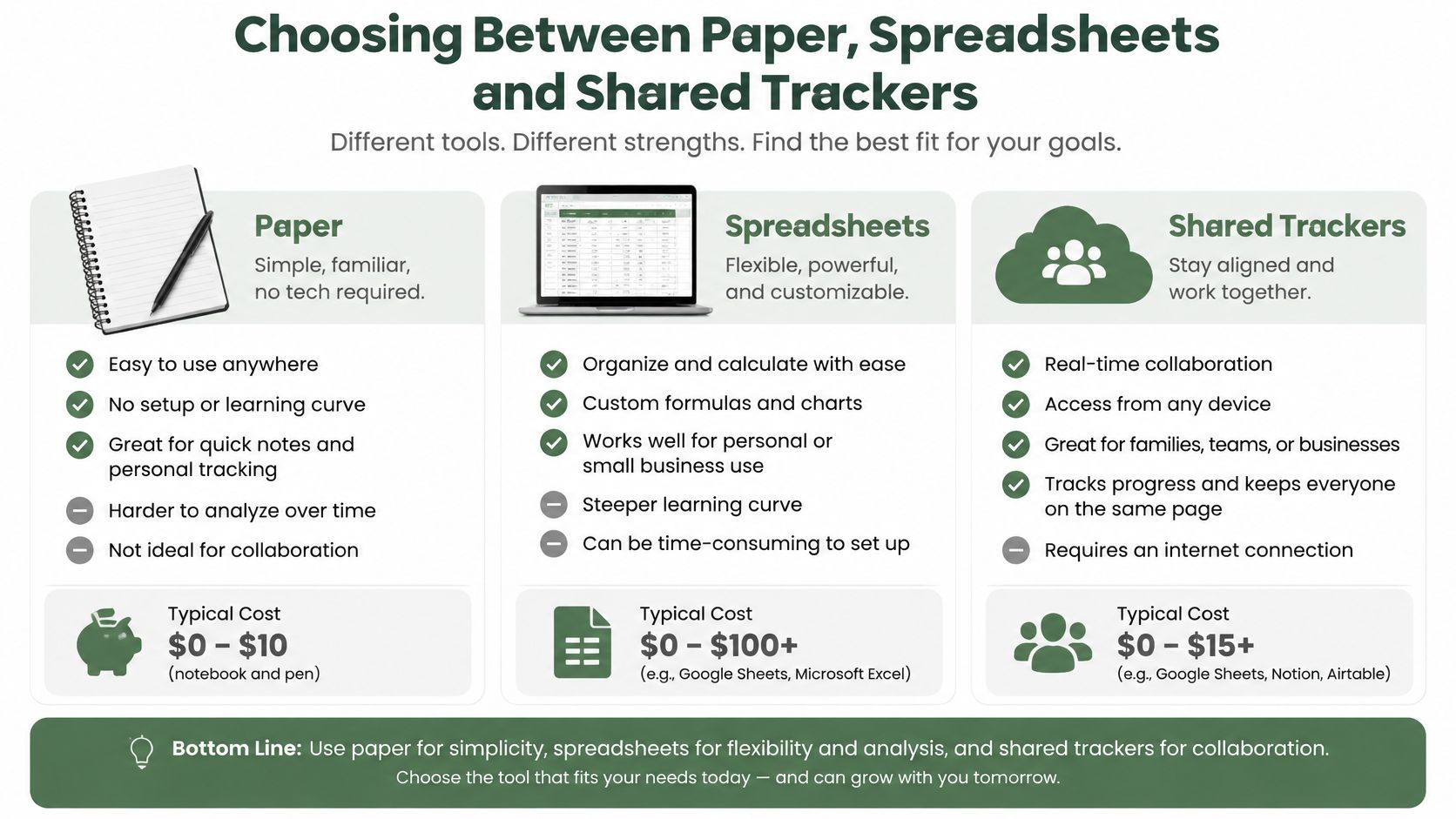
Start with the people using the record. Can the adult at the door make an entry easily? Can staff identify the recorder, retrieve an earlier version, and recover the record if the device or connection fails?
Paper, spreadsheet and shared tracker compared
| Format | Timestamps | Correction trail | Parent visibility |
|---|---|---|---|
| Paper sign in sheet | Only if the adult writes the time at the door | Crossed-out entries and initials | Parents see it when they visit or receive a copy |
| Spreadsheet | Only if someone types the time when it happens | Version history must be enabled and retained | Shared file access must be managed |
| Shared tracker with browser access | Choose a system that timestamps entries as logged | Require recorded, visible changes | Real-time visibility when supported and connected |
A tracker's features need checking individually. Browser access doesn't automatically establish an audit trail, and a shared spreadsheet shouldn't expose other children's information to every family.
Check compliance separately from convenience
ChildCare.gov's licensing guidance explains that US child-care licensing is administered by states and territories, whose requirements can differ. Check the applicable agency's rules for fields, signatures, retention, and electronic records before replacing an official form.
- Writing access: Give each person appropriate permissions rather than sharing an unrestricted file.
- Corrections and backups: Confirm how changes are preserved and records are recovered.
- Connectivity: Test what happens without internet, including how pending entries are identified.
- Family visibility: Decide which information parents can see without exposing another child's record.
At Cradlo, our shared baby and child care tracker lets daycare use a bookmarked browser page on an iPad without installing an app or creating a login. Logs appear on parents' phones in real time, supporting the communication described in our daycare app for parents guide.
Treat that shared care timeline as a companion to official attendance unless the program has confirmed otherwise. Check licensing first, then choose a workable format that families will read.
Confirm the Sign In Routine With Your Daycare
Ask the coordinator for a short rehearsal before a busy morning. Bring a labeled fictional row for Maya Chen: an example care date, an 8:12 a.m. arrival, a parent's name and signature, and blank departure and staff-confirmation spaces. Treat it as a practice handoff, not a completed record.
Let the teacher mark unused fields and add anything missing. Those blanks are deliberate. They mark the handoff points that protect the parent at drop-off, the nanny at pickup, and the staff member who releases the child.
Make the doorway agreements explicit
- Who writes: Name the adults allowed to enter or correct attendance.
- Whose name appears: Confirm a nanny or grandparent signs under their own name.
- Where authorization lives: Identify where staff find the current pickup list at the door.
- Who handles uncertainty: Name the contact used when an unlisted adult arrives.
Ask which formats the program accepts under its state or territory requirements. If a shared browser page sits beside the official record, agree on what belongs in each place and who maintains it.
Cradlo's browser workflow lets daycare bookmark one link on its iPad, and logs flow to the parent's phone in real time. Cradlo starts with a 7-day free trial, after which you can choose Plus at $4.99/month, Plus at $49.99/year, or Lifetime at $99.99 one time.
Walk through drop-off and pickup on Maya's sample row. Then use the routine at the first real handoff, with the coordinator nearby to clarify anything awkward.
Cradlo gives parents, partners, grandparents, nannies, and daycare a shared place for everyday care updates alongside the program's official attendance process. Visit Cradlo to explore a shared timeline and discuss how it fits your daycare's handoff routine.